Saphan Desktop (beta)
What Saphan Desktop is, what the beta does today with the Claude desktop app, and what it does not do yet.
⚠ Saphan Desktop is a beta. It is furthest along with the Claude desktop app. Every other application on its screen is marked Experimental support, and this page says what that means. Nothing in the beta is described as "protected": each session shows, layer by layer, what is actually in force.
What it is
Saphan Desktop is a macOS application that starts the AI desktop apps you already have installed — the original, vendor-signed apps, in their own windows — inside a session that Saphan controls. You choose the application, the network policy and the working folder before the app starts; the session ends when you stop it, and Saphan stops every process the app started.
The idea is the same one Saphan Studio applies to its agents: a person sets the limits before the work starts, and the record shows afterwards what was allowed and what was refused. Saphan Desktop brings that to the desktop apps people use every day.
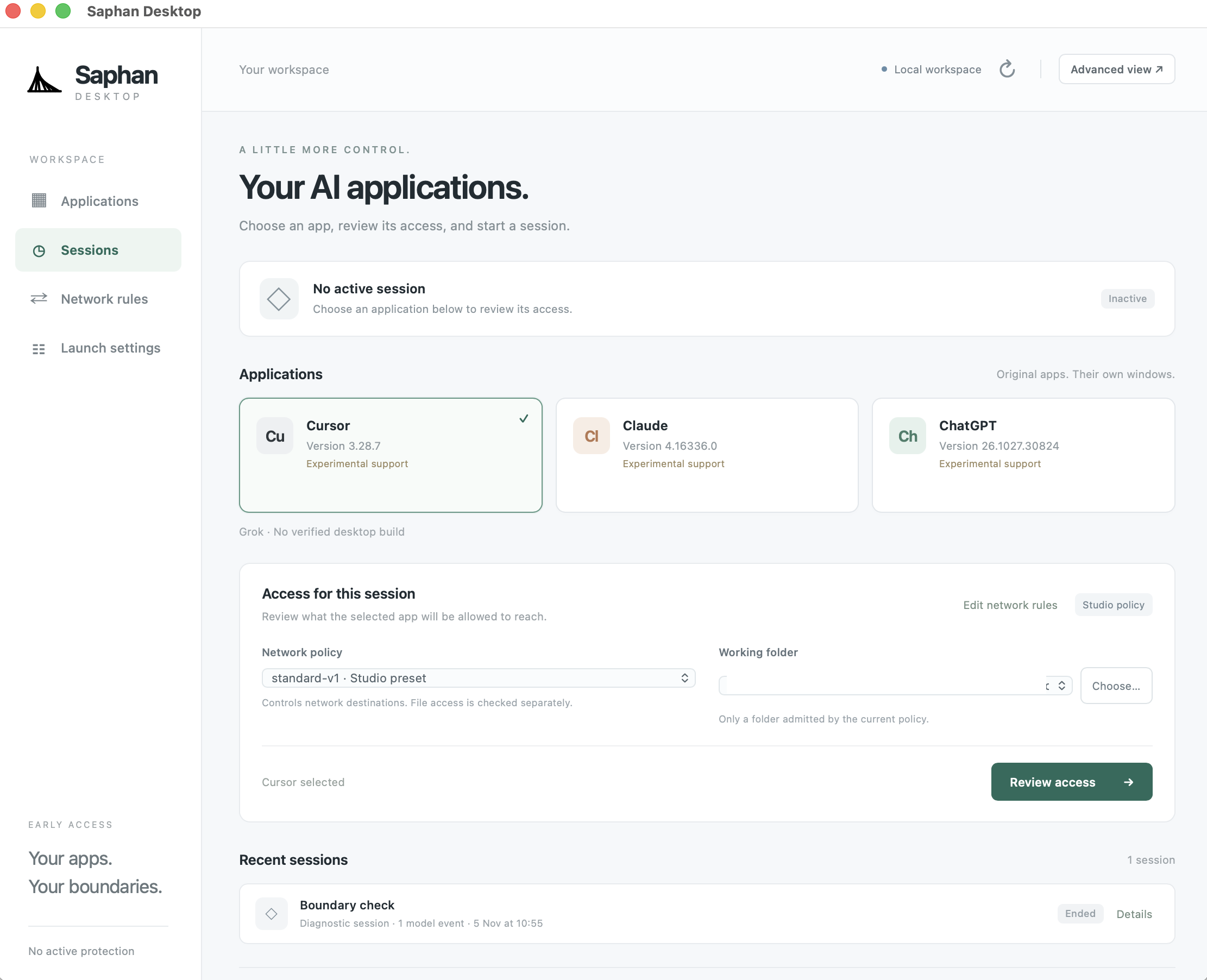
What you see
The sidebar has four pages: Applications, Sessions, Network rules and Launch settings. The header shows the workspace the app is connected to — Local workspace in the beta — and an Advanced view link with the full session details.
Applications — "Your AI applications. Choose an app, review its access, and start a session."
| app | how the beta lists it |
|---|---|
| Cursor | Experimental support |
| Claude | Experimental support |
| ChatGPT | Experimental support |
| Grok | No verified desktop build |
- The cards list the supported apps that are installed on this Mac, with the installed version. "Original apps. Their own windows." — Saphan does not repackage or modify them.
- An app with no verified desktop build is listed by name and cannot be started.
- Access for this session — what the selected app will be allowed to reach:
- Network policy — for example
standard-v1 · Studio preset. "Controls network destinations. File access is checked separately." Edit network rules opens Network rules. - Working folder — "Only a folder admitted by the current policy."
- Review access shows the plan for this session before anything starts.
- Network policy — for example
- Recent sessions — the sessions you started, with their state and a Details link.
Network rules — the destinations a session may reach. Unlisted destinations are blocked; a more specific rule makes an exception. Changes apply to new sessions: a running session keeps the policy it started with.
Launch settings — an optional automatic launch: the application, policy and folders you saved on Applications, started when Saphan Desktop opens. It is off until you switch it on, and before every automatic start Saphan checks again that the app, the policy and the folders are still the ones you saved; if anything changed, the start is refused.
What works today with Claude
In the current beta build, with the Claude desktop app:
- Saphan starts the original Claude app with a private, per-session profile and stops its whole process tree when the session ends. Claude's own sandbox stays on; Saphan does not weaken it.
- Network. The app is pointed at the session's Saphan network control and judged under the network policy you chose. A connection the policy turns away is recorded, with the program that made it when that is known. A host the policy permits is recorded once per session.
- Commands Claude Code runs inside the app reach the network only through Claude Code's own sandbox, which Saphan switches on and locks for the session.
- Credentials. Claude keeps its keys in a keychain that belongs to the session. In the runs measured so far it did not change your login keychain.
- Sessions. Each session appears under Sessions with its state.
What it does not do yet
| Today in the beta | |
|---|---|
| Files | ⚠ Files are not isolated yet. The app runs with your user's file access; only its profile and temporary directories are moved into a private, per-session directory. Your login keychain therefore stays reachable to an app that names it by path. |
| Programs that ignore the network setting | ⚠ Nothing yet holds the app's own direct connections. A program the app starts that ignores the session's network setting is not stopped; that needs an operating-system network filter, which is not active in the beta. |
| What the record misses | A host that Claude Code's own sandbox allows may be reached without Saphan recording it, and a host that sandbox refuses on its own is not recorded by Saphan. Past 200 refused connections in one session, further refusals are only counted. |
| Tools that run at the vendor | Tools that run on the vendor's servers — for Claude, web search and web fetch — never cross your network, so no local policy can see or stop them. |
| Model guardrail | Not applicable in this mode: Saphan does not judge the conversation with the model. |
| Other applications | Cursor and ChatGPT are listed with Experimental support: the sandboxing that the Claude app has is being built for them now. Support for them is coming; until then, do not rely on a session of theirs for any limit. |
| Platforms | macOS on Apple silicon only. Linux and Windows are not supported. |
| Organisation policy | The beta works with a local workspace on your own Mac. Connecting Saphan Desktop to a Saphan Studio installation, so that your organisation's policy applies, is not part of the beta. |
How to try it
Saphan Desktop is not yet offered as a public download. To take part in the beta, contact us at hello@saphan.ai.
When you start a session, read its access plan under Review access first. The app never shows a session as protected on the strength of the settings alone.